
Challenge
You're a member of a shared calendar, but don't know where to access it in Outlook.
Solution
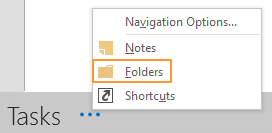
1. In Outlook, click the three (3) dots located in lower left corner, and click Folders
2. Scroll down and locate Public Folders - Your E-mail > All Public Folders > PFonline > then the calendar you have access to. In this example we'll use the Patient Accounts Calendar
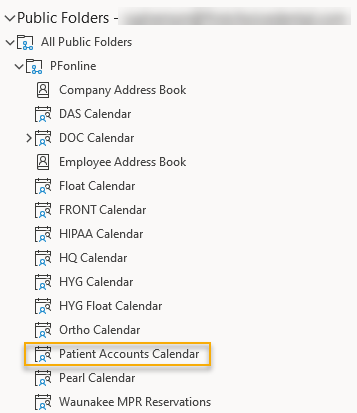
3. You can either click on Patient Accounts to view the calendar directly from this window, or right-click and select Add to Favorites...

4. Clicking Add to Favorites... will make a shortcut, and allow you to access this calendar under Other Calendars in your normal calendar window, and allow you to skip the previous steps when accessing the shared calendar going forward

More Information
Occasionally, adding the calendar to favorites can take some time and/or require an Outlook restart
Comments