
Challenge
IOC display screen is static. This solution should resolve problems with Gendex IOC's using the older USB TV Tuners.Cause
These devices can display problems and the settings may need to be adjusted.Solution
1. Open cabinet with computer and unplug small ATI Screen Capture device for 30 seconds. Then Plug back in. This device looks like a small black USB Thumbdrive.
/2009/12/17/953627f5-5bc7-48f6-96d8-e3bc8a6494ea/953627f5-5bc7-48f6-96d8-e3bc8a6494ea.jpg)
2. In MiPACS open the Video Plugin (1)

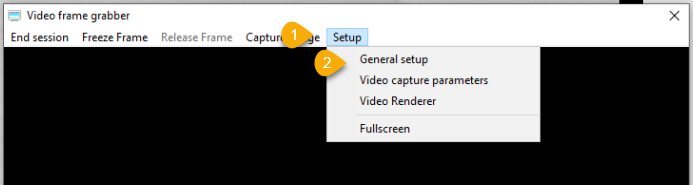
3. In the Video Frame Grabber screen click Setup (1) followed by General Setup (2).
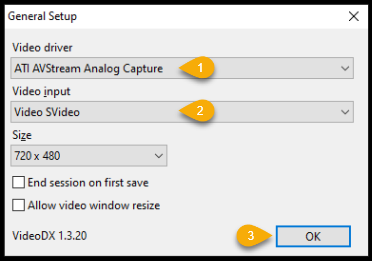
4. In the General Setup dialog screen you will have two options, and this might require a little trial and error until you find the correct settings.
a. Video Driver (1)
i. If it's none, select the other option.
b. Video Input (2)
i. This should be SVideo or S-Video. It may differ.
c. Click OK (3) if IOC is on and there is now an image in the screen.
More Information
Contact help@firstchoicedental.com if further assistance is needed.
Comments