
Challenge
Connecting to the FCDG VPN using Cisco AnyConnect
Cause
To access the FCDG internal network you need to connect to the VPN.
Solution
1. Click on Cisco AnyConnect icon
a. Desktop Shortcut

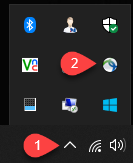
b. System Tray Shortcut
i. Click on the Caret (1) then click on the Cisco AnyConnect icon (2)
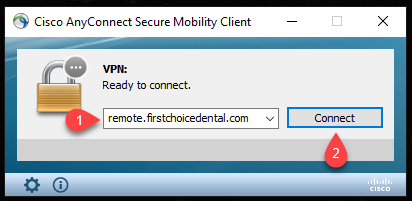
2. Cisco AnyConnect Menu
a. In the Dialog Box (1) enter: remote.firstchoicedental.com then click Connect (2)
b. Enter your username and password in next dialog screen.
More Information
Please send an email to help@firstchoicedental.com if you need further assistance.
Comments