
Challenge
A distribution group displays as no longer valid in Outlook and you need to remove them from the AutoComplete List
Cause
Distribution List Name, Address or Location changed and needs to be updated.
Solution
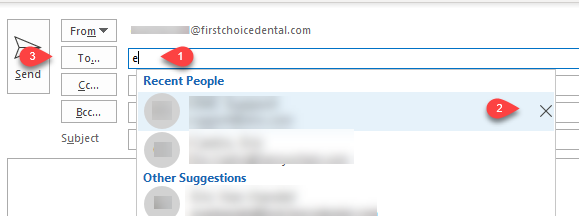
1. In To... / Cc... or Bcc... type email address (1) name to bring up Auto Complete list.
2. Click X (2) to delete record
3. Click To... / Cc.. or Bcc... (3) & search for email address.
More Information
Contact help@firstchoicedental.com if this does not resolve the problem.
Comments