
Challenge
SmartCeph will not open due to bad install files.
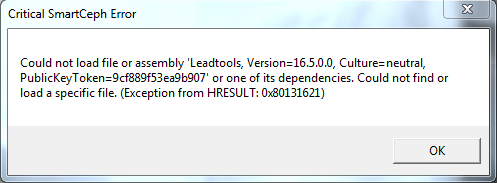
Cause
Ortho2's installer came with a bad version of SmartCeph and we need to put the correct files in it.
Solution
1. Download RegisterAll.bat & Unzip SmartCeph (Fix).zip
2. Copy Files into Ortho2's software directory.
a. %systemdrive%\Program Files (x86)\Ortho2 or %systemdrive%\Program Files\Ortho2
3. Open Command Prompt with Admin Rights.
a. Navigate to Ortho2's Install directory and run RegisterAll.bat
4. Use SmartCeph in Ortho2 to verify it works.
More Information
Contact Ortho2 if this does not resolve the problem.
Comments