
Challenge
K7 device is not registering with software and showing up as hardware.
Cause
Settings & configuration can cause this to happen.
Solution
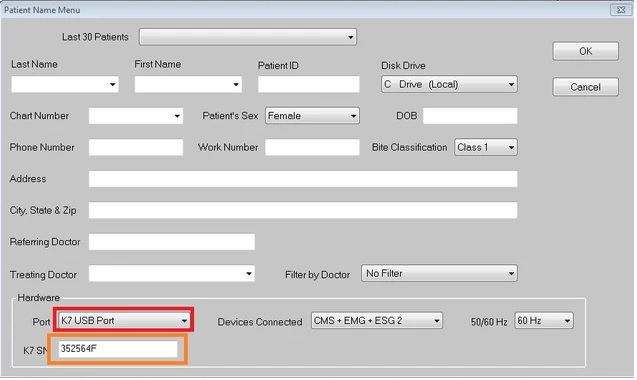
1. K7 Device not connecting
a. Verify correct serial number is entered (Orange Box)
b. Verify correct port is selected (Red Box)
i. If wrong serial number is entered, the wrong port information will show up
2. Device is acting slow when collecting data.
a. Go into the Device Manager.
i. Ports (COM & LPT)
a. Prolific USB-to-Serial Comm Port
i. Verify it's version 2.1.27.185.
a. If it's newer, roll back to this install.
b. If there is no roll back driver, install the correct drivers.
i. Turn off K7 Unit
ii. Uninstall Drivers in Device Manager for "Prolific USB-to-Serial Comm Port"
iii. Go into the %SYSTEMDRIVE%\K7\ directory and install
"PL2303_Prolific_WDMDriver_v152.exe"
iv. Go back in and make sure the correct driver shows up now in Device Manager.
More Information
ENTER MORE INFORMATION IF APPLICABLE - i.e. - Please remember to close out all applications before leaving for the day.
Comments