
Challenge
Your password needs to be changed.
Cause
You may have had your password reset and need to change it from the default or you want it to match your current Windows login password.
Solution
1. Open Dentrix
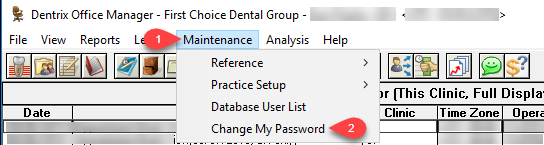
2. Click on Maintenance (1) drop down, then Change My Password (2)
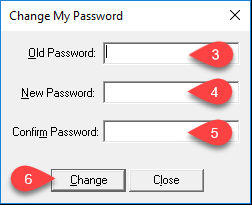
3. Enter Old Password (3) (If you just had your password reset, this is the one that was provided to you. Followed by your New Password (4,5) twice. Click Change (6) to confirm change.
a. Dentrix Password Rules
i. At least 6 Characters
ii. Cannot use the same password twice
More Information
If you need your password reset, please contact help@firstchoicedental.com
Comments