
Challenge
Instrumentarium SnapShot Sensor is not functioning as intended. Here are a few items that can be done to help fix the problem immediately.
Cause
Sometimes there are software or hardware problems that occur that require manual input to get these sensors working.
Solutions
Option 1: Use Sensor Fix tool
1. Unplug Instrumentarium SnapShot Sensor from USB port.
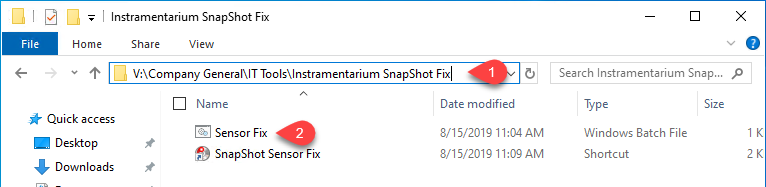
2. Navigate to V:\Company General\IT Tools\Instramentarium SnapShot Fix (1)
a. Run the file Sensor Fix.bat (2)
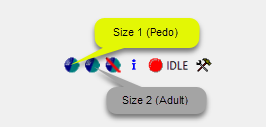
3. Open MiPACS and Activate SnapShot Sensor using the button for the correct size of sensor.
Option 3: Reboot PC
1. Disconnect Sensor from USB Port.
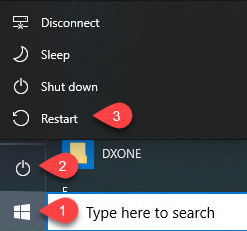
2. Reboot Windows 10
a. Click Start Button (1) then the Power Button Icon (2) followed by Restart (3)
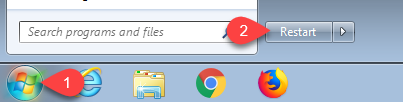
3. Reboot Windows 7
a. Click on the Start Orb (1) followed by Restart (2)
4. Reconnect Sensor into USB port on wall & open MiPACS and attempt to activate X-Ray Sensor.
More Information
These are fixes that might fix the problem if IT is unable to help right away.
Comments