
Challenge
Some web sites are moving away from support for Internet Explorer and we need to move to newer browsers (i.e. Edge, Firefox or Chrome).
Cause
Microsoft is stopping support for Internet Explorer 11 in the coming years and we will need to use other browsers while using Windows 7 for all sites to work properly. This guide also contains information on changing the default browser in Windows 10.
Websites such as Delta Dental & PBHS do not support Internet Explorer anymore and we need to transition to a newer browser.
Solution
Windows 10:
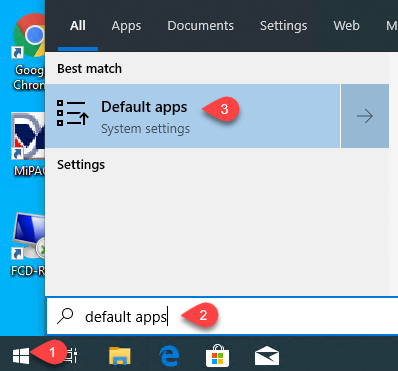
1. Click on the Start Button (1) in the Search Box Type: Default Apps (2) (You may not need to type the whole phrase), then click on Default apps (3)
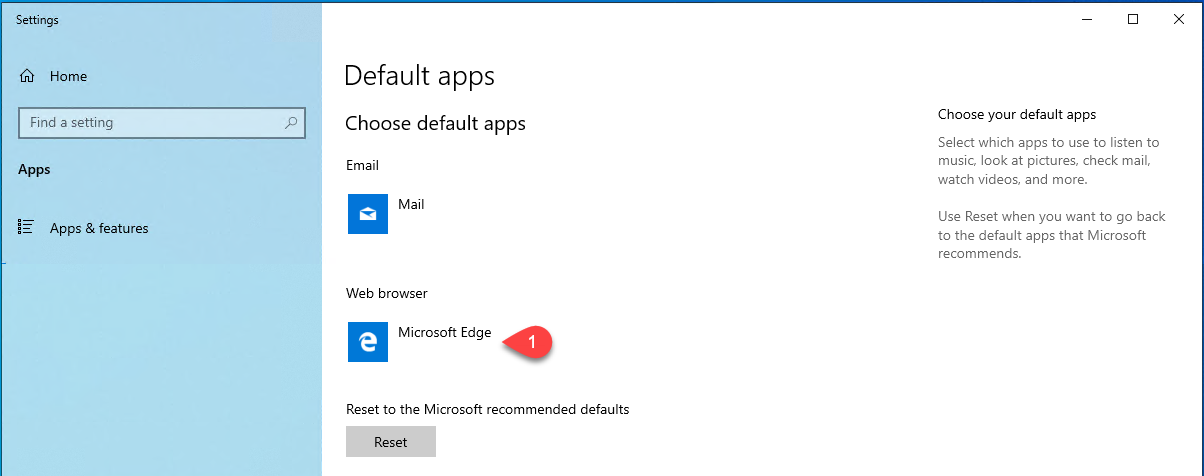
2. Click on Web Browser (1)
3. Select Google Chrome (3) or Microsoft Edge
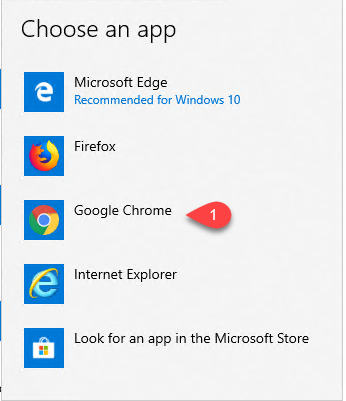
4. Google Chrome will now be your default browser for this computer.
More Information
Please let help@firstchoicedental.com know if you need Chrome installed on your local PC. PC's that are attached to a check scanner for Park Bank will not be saved and will be reverted back to Internet Explorer.
Comments