
Challenge
Settings for Epson's scanning software do not transfer from user to user.
Cause
Settings for Epson's scanning software do not transfer from user to user.
Solution
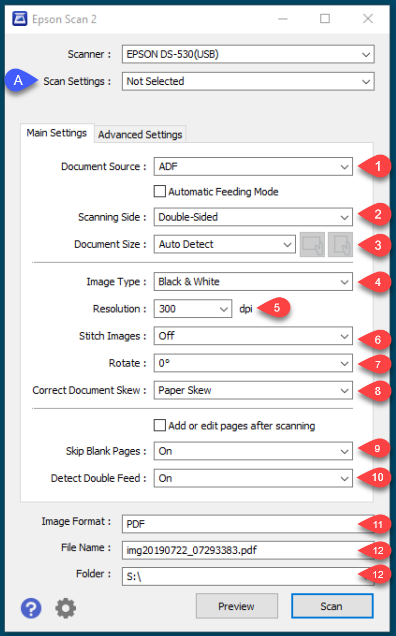
- Epson DS-530 Scanner Settings
- Document Source: ADF
- Scanning Side: Double-Sided (Your site may prefer it to be singled sided)
- Document Size: Auto Detect
- Image Type: Black & White
- Resolution: 300 dpi
- Stitch Images: Off
- Rotate: 0
- Correct Document Skew: Paper Skew
- Skip Blank Pages: On
- Detect Double Feed: On
- Image Format: PDF
- File Name: Leave Default
- Folder: S:\ (Or whatever your scan folder is)
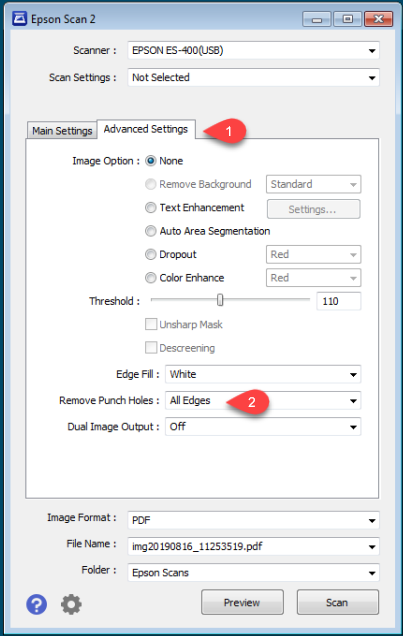
2. If you chose Double Sided, you may need to set it so the software ignores hole punches
1. Click Advanced Settings (1)
2. Remove Punch Holes (2): All Edges (Other options are Top/Bottom or Left/Right. Please select option best for your purposes.)
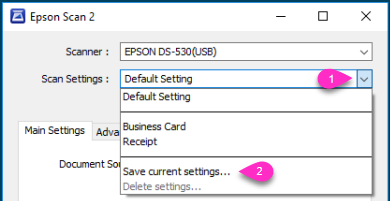
3. To Save your settings
1. Click down arrow next to Default Setting
2. Click Save Current Settings...
More Information
If you need support with this unit, please contact help@firstchoicedental.com
Comments