
Challenge
Windows is requesting a password change and you would like to change it at a convenient time.
Suggestions to create a strong password:
Strong passwords help prevent unauthorized people from accessing files, programs, and other resources, and should be difficult to guess or crack. A good password:
- Is at least 12 characters long
- Doesn't contain your user name, real name, or company name
- Doesn't contain a complete word
- Is significantly different from previous passwords
- Contains uppercase letters, lowercase letters, numbers, and symbols
Cause
First Choice Dental requires password changes every 90 days. You will start to receive reminders to change password 5 days prior to being forced at next login.
Solution
Windows 10
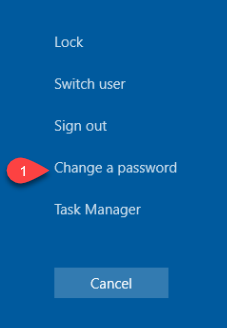
1. Press Ctrl+Alt+Delete, and then click Change a password... (1).
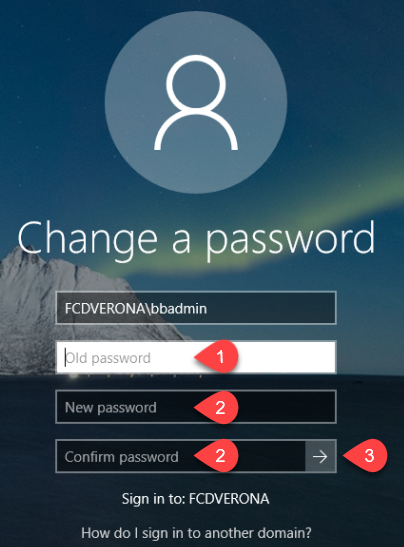
2. Type your Old Password (1) then your New Password (2) twice. Then click the Arrow (3)
More Information
Please be proactive about changing your password. Your computer should prompt you a few days in advance about changing your password, which can prevent errors like these.
Comments